Free
See what is in the public record.
$0No card needed
Look up a Federal OSHA citation and see the draft before you commit.
- Public OSHA citation preview
- Watermarked draft PDF
- No paid COMMAND capabilities
Public data. Nothing is signed or submitted.
CiteClock for employers
Enter your inspection number. CiteClock pulls your citation from the public OSHA record and shows each item, its dates and the evidence to gather, before you sign up or pay.
No account or credit card required.
No inspection number? Search by company nameNo public record for your inspection? Upload your citation instead
Independent software. Not affiliated with OSHA. Not legal advice.
From public record to your paperwork
If the hazards have been corrected, the next step is documenting the work. If an item isn't fixed yet, leave it unconfirmed. CiteClock never decides that for you.
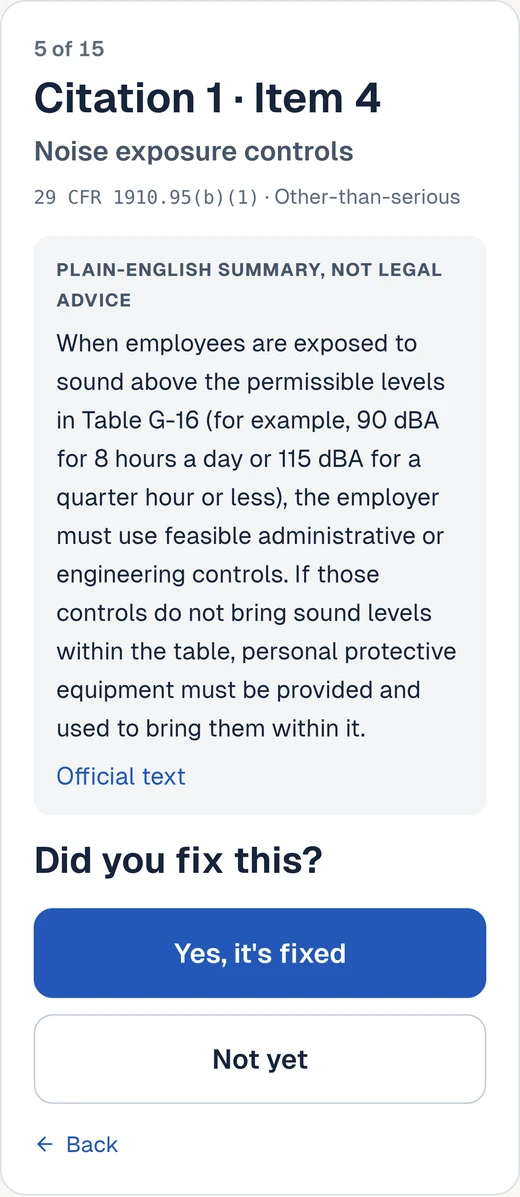
For each cited item, tick that it is fixed and type the date and what you did. Nothing is ever confirmed for you.
Snap a photo or add a receipt from your phone. It is filed under the right item.
Download the clean packet and sign the certification. CiteClock never signs anything.
Send it to the OSHA Area Office printed on your citation, and post the employee notice.
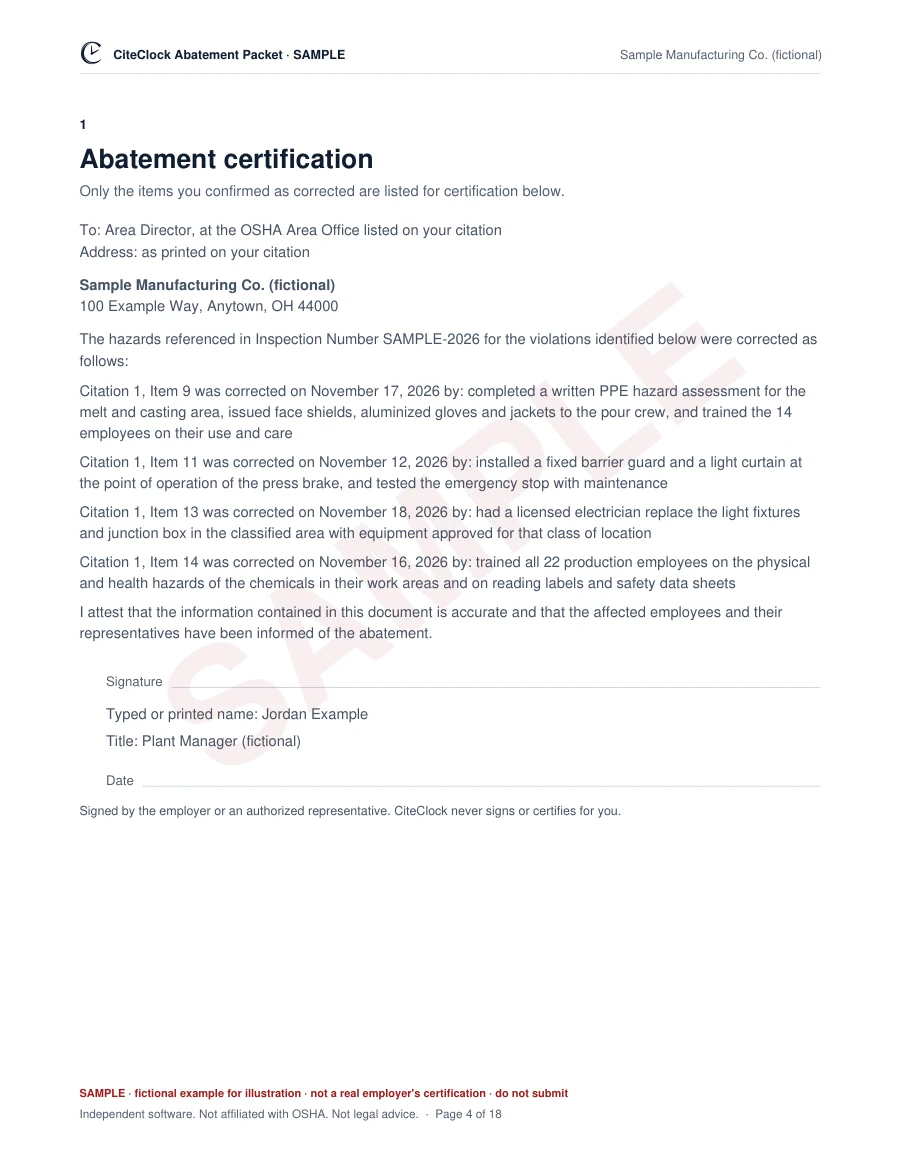
See the actual output
Open a completed sample packet: cover, items at a glance, the certification letter, each item with its photos and records, the employee posting and an evidence index. 18 pages, made by the same software you would use.
The sample's corrections and files are fictional and marked SAMPLE. Only you can confirm corrected items and sign your own packet.
Or open the draft packet of a real historical record · No purchase required
Honest comparison
OSHA gives you the format for free. CiteClock does the organizing around it: your items, your dates, your proof and the paperwork, in one place.
Only one or two simple items? OSHA's free sample letter may be all you need. CiteClock is optional: OSHA does not require it, and using it does not guarantee that OSHA accepts your certification. The rule is 29 CFR 1903.19 .
See a completed sample packet to judge the difference yourself.
For teams
COMMAND adds assignments, phone evidence links for your workers and supervisor review, for up to 5 people on one case. Start the same way: check your citation for free, then choose the plan that fits.
Open task
Review a draft plan, choose the work and name the person who will do it.
Next: send a secure link for this task.
Included with an activated case. One employer case with ongoing access for new purchases. No company-wide subscription. Sales tax or VAT may be added at checkout where applicable.
See the finished sample packet Follow-up reminders can prompt your team to recheck each correction.ONE CASE. YOUR WAY.
Organize your correction evidence and OSHA paperwork in one place.
Start with the free public preview. No subscription. No automatic renewal.
See what is in the public record.
$0No card needed
Look up a Federal OSHA citation and see the draft before you commit.
Public data. Nothing is signed or submitted.
For the person handling the closeout.
$49per case
Keep the facts, evidence and finished packet together. Work at your own pace.
Single user. Team tools, worker links, approvals, corrective-action planning and follow-up reminders are COMMAND only.
Choose Self-ServeAdd COMMAND later for exactly $100. Sales tax or VAT may be added at checkout where applicable.
FOR TEAMS & RECURRING CHECKS
From corrective work to the next check.
$149per case
Assign the work, gather proof and review it together. Keep follow-up checks on the calendar.
Access applies to this case only.
Start solo. Bring in the team when you need it.
Upgrade an active Self-Serve case to COMMAND for exactly $100. The upgrade keeps your existing access terms. Sales tax or VAT may be added at checkout where applicable. Nothing unlocks until payment is verified.
State cases provide Administrative Evidence Organization, not regulatory forms.
Prices are USD before tax. Sales tax or VAT may be added at checkout where applicable. Access continues while CiteClock operates, subject to the Terms of Service. No subscription or scheduled renewal.
Secure Checkout by Paddle. Billing note: Your purchase is for CiteClock. Paddle processes the payment as Merchant of Record. The operator’s registered name, Quote reclaim, may appear at checkout. Questions? hello@citeclock.com.
What CiteClock is
The lookup uses available U.S. Department of Labor data, with links to check the source. Review it against your citation.
For Federal OSHA cases, the certification letter follows the sample in Appendix A to 29 CFR 1903.19, item by item.
Nothing is certified unless you confirm it. CiteClock never signs or files anything for you.
Free preview. Self-Serve $49 for one person, or COMMAND $149 for up to 5 people on one case. One-time purchase per case. Access continues while CiteClock operates, subject to the Terms of Service. Sales tax or VAT may be added at checkout where applicable. Full refund within 14 days.
Product and policy answers. Contact: hello@citeclock.com.
No. CiteClock is independent software. It is not OSHA, not affiliated with the U.S. Department of Labor or any government agency, and it never files anything with OSHA for you.
No. CiteClock prepares paperwork from the public record and keeps it organized. It is not a law firm and does not tell you whether to contest, settle or certify. If your case involves a contest, a settlement negotiation or a serious injury, talk to an attorney or a safety consultant.
You can, and if you prefer, OSHA's sample letter is free. CiteClock starts from your inspection's public record instead of a blank page: every cited item with its standard and abatement date is already laid out, each item gets its own page for your photos and records, and the employee notice and the Area Office address are included. COMMAND adds assigned tasks, task-specific phone upload links, supervisor reviews and internal follow-up checks. Your files, dates and decisions stay together in one private case.
Self-Serve is $49 for citation management, personal evidence, a missing-document checklist and clean exports. COMMAND is $149 and adds corrective-action planning (draft plans you review and approve), tasks, worker links, supervisor review and follow-up reminders for up to 5 people. Each purchase covers one case. Access continues while CiteClock operates, subject to the Terms of Service. Sales tax or VAT may be added at checkout where applicable. An active Self-Serve case can upgrade to COMMAND for $100; that upgrade keeps the case's existing access terms. No subscription or scheduled renewal. Employer plans and pricing.
Paddle is the Merchant of Record: it processes your payment, handles sales tax and sends your receipt. CiteClock provides access to the purchased software.
Quote reclaim is the registered operator of CiteClock. Paddle processes your payment as Merchant of Record.
Yes, as an Evidence-Only case. The free lookup finds eligible State Plan inspections in the public record, and you can buy the case from its preview without uploading a PDF. It organizes your citation items, photos, records and corrective-action notes. CiteClock does not calculate State deadlines or produce State forms, so follow your agency's instructions. Deadlines, the certification letter and the employee posting are for Federal OSHA cases only. If your inspection is not in the public record, upload your citation instead.
Generally, yes. Under 29 CFR 1903.19, within 10 calendar days after each abatement date you tell OSHA in writing that each cited item was corrected, with the date and how, and that affected employees were informed. Willful and repeat items, and serious items when the citation says so, also need documents such as photos or receipts. You also post a copy or summary for employees. The exception: items the OSHA inspector saw corrected within 24 hours and noted as corrected in the citation. Read 29 CFR 1903.19 on eCFR.
Use the dates in your settlement agreement or approved petition. On your case page, tap “Did a settlement change your dates?” and type them in: the estimates update right away, and if you buy, they are saved to your packet.
Then you're done. Keep copies. You don't need us.
Case pages show only public enforcement data. Photos, files and notes you add go to your private case, visible only to you and anyone you invite. No ad trackers or tracking pixels. Privacy policy.
Full refund on request within 14 days of purchase. Email hello@citeclock.com. Refund policy.
Already wrote your abatement letter? Check it before you send it. SendReady reads your draft on your own device and shows what it found, what is missing and what needs your review. Free, with no account and no upload. Check my documents
No account or credit card required. Independent software. Not affiliated with OSHA. Not legal advice. CiteClock does not sign, certify or file anything for you.